DEVELOPERS_GUIDE.md
Note
I’m just linking the top-level DEVELOPERS_GUIDE.md (which can be read online on github) here, so it can live on ReadTheDocs as well. As paths to images are hard coded in the markdown, I’ve added softlinks inside docs/sphinx/developers_guide (where the images live) to docs/sphinx/developers_guide/docs/sphinx/developers_guide so we can use the same images in the markdown as in the sphinx documentation. Bit clunky but hey it works.
Developer’s Guide
This document is intended to give a rough overview of the structure of the
WODEN package. I’m aiming it at a senior PhD student or ECR who might inherit
the package. I’ll assume you’re proficient at Python, but are new to compiled
languages. I’ll also assume you understand interferometers, otherwise
deity-of-choice help you, good luck. I’ve including some practical reasons as
to why the code is structured the way it is, to try and help you make sense of it.
This guide will be in no way exhaustive, and will be aimed at developing code
in a Linux environment. Hopefully it helps you future peoples. FYI, I’m not
including installation instructions for things like gdb and valgrind here
as they are google-able. I link the doc pages for anything I think needs to be
installed so I reckon you have enough to go on.
Jack Line, March 2025
Overall code structure
The WODEN package is split into two main parts: the compiled code, and the Python
code. As linking in compiled dependencies can be a bit of a pain, I’ve tried to
keep as much functionality in the Python code as possible. The compiled code
is mainly there for speed, especially the GPU code. The main Python script
is run_woden.py, which calls in wodenpy. The main compiled executable is
called run_woden, which is compiled from woden.c. The split of functionality is
roughly as follows:
run_woden.py: Parse command line args, read any input files, prep sky models for processing, setup observation params, launch and run compiled code, retieve outputs from compiled code, and write output files.woden.c: takes in chunks of sky models and observational parameters, and calculates primary beam responses and visibilities, on either the CPU or GPU.
Design decisions
Certain computational limitations have resulted in some specific architecture decisions. The largest of these are listed here for clarity.
The measurement equation is embarrassingly parallel (technical term, honest) so it fits really well on a GPU. So as we’re trying to make code capable of running massive simulations, I’ve built the code with the GPU at the core.
GPUs have a limited amount of memory, so we sometimes can’t load the entire sky model into memory at once. Instead, we load in chunks of the sky model, and process them one at a time.
Furthermore, a GPU is most efficient when it’s fully loaded with threads that are all doing calculations that take the same amount of time. For this reason, we split the GPU calculations by components type, that being point source, Gaussian, or shapelet. This adds another layer of complexity to the sky model chunking.
For point sources and Gaussian-type component, each component is essentially three calculations: calculate primary beam, extrapolate flux density, calculate visibility via measurement equation. It’s therefore most sensible to go parallel over both the components, and the baselines, which maximise load over the GPU. Shapelet models however have a bespoke number of basis function-related calculations, which scale to how complicated each shapelet model is. A simple model might only have 30 basis function calls; Fornax A has 3000 per lobe. So instead, we go parallel over the basis-functions, and the baselines, which maximises load over the GPU. However, this again adds another layer of complexity to the sky model chunking.
One extra layer complexity is that very very large sky models (such as 21cm models) can have 40+ million components. Depending on the system, this can be too large to even read into memory, let alone process. So
WODENhas been setup to lazy-load the sky model. This requires a first pass to count the number of components and their types, without loading the full catalogue information. Using this information, we can make a map of chunks to process, and then read in batches of full information of chunks of sky model, and pass them to the GPU (or CPU) for processing.Finally, as the CPU is essentially idle when the GPU is running, it’s most efficient to have the CPU read in the next chunk of sky model, and prepare it for the GPU, while the GPU is processing the current chunk. So
run_woden.pyhas been setup to run multiple threads, so that we always have sky model information ready to feed into the GPU.A separate consideration is when using the EveryBeam primary beam code, which is only available on the CPU. The majority of compute time is spent running EveryBeam calcs. It makes no sense having the GPU sitting there idle, so I’ve made a CPU-only version. In this case, we don’t actually want the CPU to be reading in the next chunk of sky model, as it’s busy processing the current chunk. So
run_woden.pyworks the launching of visibility compute threads and sky-model reading threads differently depending on whether the CPU or GPU is being used.Speaking of CPU-only mode, I’ve implemented this by having fully equivalent functions in the CPU and GPU code. Any code in the
srcdirectory that hascommonin the name is designed to either call an equivalent function with eithercpuorgpuin the name. Given the fact that CPU and GPU memory are separate physical things, there are extra commands to copy from CPU into GPU memory, but aside from that, it should be obvious where to split the code. I’ve done this with the intention that if you want to add a new feature, once you get it working in either GPU or CPU code, you can just write an equivalent without thinking too hard. It also means there are multiple examples of GPU/CPU equivalents, which you can use as examples to learn from (hopefully).The base compiled language is
C. This wasn’t really a decision per se, just that theRTS(Mitchell et al. 2008) was written inC/CUDAand that’s how I learnt to do this stuff. This does require a level of “name mangling” (see Compiled code practicalities below for more details on what that means). I think if you translate theCintoC++you could avoid the name mangling. If you really wanted to, you could consider rewriting intorustas that is more memory-safe, but you’d have to change the entireCMakebuild architecture, the Testing environment, and thePythonbindings. There are no state secrets in the code; the only risks we have really are memory leaks and segfaults.For the
EveryBeamMWA beam model, I’ve had to make my own branch of EveryBeam. This is because inWODENwe precess the array position back to J2000, rather than precessing every source position forward to the current epoch. The default inEveryBeamis to precess all the source, which is does under the hood. The only way I could work out to switch this off was to create a copy of the MWA telescope object withinEveryBeamitself, calledMWALocal, that takes inaz,zacoords directly. There might be a way to overload the current MWA telescope object, but I’m too new toC++to make it work. If you want to tidy things up, talk the the authors of theEveryBeampackage. For me, thehyperbeamMWA model is superior, so I think it’s low priority to fix this.
More detailed breakdown
Here is a more fine-grained breakdown of the code, to try and help you find your way around.
Python code
Most of the heavy calculations are done by the compiled code. So along with making preparatory calculations and I/O, the Python code needs to be able to communicate with the compiled code. It does this via the ctypes library. Unfortunately, you can’t directly feed numpy arrays nor bespoke classes into C functions, so we have to convert them into C-compatible types, via the ctypes library. Furthermore, I use the concurrent.futures.ProcessPoolExecutor to handle launching multiple threads in run_woden.py. Unfortunately, anything submitted to a ProcessPoolExecutor must be picklable, so we can’t pass ctypes objects directly. So there is a an amount of class duplication, where we fille Python type classes that can be sent into each thread, and then converted into C-compatible types.
run_woden.py- Serves essentially as amainfunction for the entire simulation package. It handles setting up parallel threads to read in sky model chunks, and to launch the compiled code to process them. It also handles writing out the output files.wodenpy.array_layout- contains methods to setup the Python array layout class. Main functionality here is to precess the array back to J2000, and calculate the local XYZ coordinates of the baselines for each time step. Quick background; nearly all radio catalogues are set in J2000 coord system, a.k.a back in the year 2000. Source positions precess over time, so we need to convert them to the current epoch. Rather than precess every Ra,Dec back to J2000, we instead precess the array back to J2000, and then calculate the local XYZ coordinates of the baselines for each time step. This is much quicker than precessing every source position and is entirely equivalent.wodenpy.observational- contains boring date and position calculations, mostly for the header of the UVFITS files.wodenpy.phase_rotate- contains a method to undo the phase tracking applied byWODEN. Some pipelines (theRTSwas one) apply their own phase tracking, so an option was added to remove our phase tracking after the fact.wodenpy.primary_beam- currently, this just contains actypesinterface to theWODENwrappers around theEveryBeamcode. Being able to call the code fromPythonmeant it was easy to make notebooks to prove functionality and visualise the results.wodenpy.skymodel- the most complicated part ofwodenpy. Contains methods to read the FITS sky mode format, along with legacy code to read the oldWODENtext format, andhyperdriveyaml format. For the deprecated sky models, I just convert them internally into a FITS model, so we can apply the same code to all sky models. The functionality included here is as follows: read the number and types of all components in a sky model; crop everything below the horizon for the given observational params; make a map of all chunks to process, splitting things by point source, Gaussian, and shapelet components into appropriate size chunks; create sets of chunking maps based on the number of threads being used to read in the sky model in a way that will balance the computational load over all threads; using those chunking maps, read in the full sky model information for each chunk into a Python class.wodenpy.use_libwoden- I’ve tried to keep allctypesfunctionality in here. Contains manyctypes-class definitions in here. These class definitions have to match precisely to the equivalentCstructdefinitions that exist ininclude/woden_struct_defs.h. And by precisely, I mean the order in which attributes appear, and the exact data type. Now, a complication here, is that the compiled code comes in two flavours: one that usesfloatvalues (32-bit), and one that usesdoublevalues (64-bit). Thefloatcode is faster, but less accurate. As thectypesequivalent classes must match theCstructdefinitions exactly, to avoid huge code duplication, some of thectypesclasses have to be generated dynamically, as usingfloatordoubleis a command line option; this will create a Class that uses eitherctypes.c_floatorctypes.c_doublefor certain array. So inuse_libwoden.create_woden_struct_classes, there is a single controlling class where we can create these dynamicctypeclasses, to keep the centralised and consistent. This submodule also contains thectypesinterface to the compiled coderun_wodenfunction.wodenpy.uvfits- contains methods to write out the UVFITS files. You could consider swapping this out for pyuvdata to be more consistent with the rest of the radio astronomy community. I’ve kept it inWODENas it’s lightweight and works with all the packages we need it to.wodenpy.wodenpy_setup- handles parsing command line arguments, checking they are sane and will be able to run, all logging functionality, and code to work out what git/release version ofWODENis being run.
Compiled code
There will be more details on the compiled code later, but I’ll quickly mention a few things here. Anything ending in .c is C code, .cc is C++, and .cpp is CUDA/HIP (so GPU code for NVIDIA/AMD cards). The GPU and CPU codes must be compiled separately, and linked later, hence different extensions. The .cpp extension for GPU code is weird, as that normally means c++, but hipcc (HIP compiler) likes the .cpp extension.
calculate_visibilities_common.c- this is the gateway to the visibility calculation code, and calls either CPU or GPU code from the below depending on thewoden_settingspassed to it. This centralises the visibility calculation code, so anyting common between component types (point,gaussian,shapelet) and device (CPU/GPU) isn’t repeatedcalculate_visibilities_cpu.c/calculate_visibilities_gpu.cpp- contain specific functions for malloc-ing and free-ing memory required bycalculate_visibilities_common.cin device specific ways.call_everybeam.cc- this contains all the wrappers around theEveryBeamcode. Has links tocasacore(shudder). MultipleEveryBeamfunctions are not thread-safe, so I’ve selected a couple of functions that are, using the mutex functionality written into those specific functions. Gotta be done as we have multiple threads running during CPU-only mode.check_compilation_flags.c- this simply checks whether the code was compiled with the-DHAVE_EVERYBEAMflag (set by CMake at compilation time, see below). This function is wrapped intowodenpy, so it can check if we can use EveryBeam or not and error if the user asks for it when it doesn’t exist.fundamental_coords_cpu.c/fundamental_coords_gpu.cpp- contain functions to calculatelmnanduvwcoords on CPU or GPU.hyperbeam_error.c- this is a little wrapper around theEveryBeamerror handling, so that it goes to theWODENlogger.logger.c- small logging functionality that can be linked to thePythonlogger. This allows all logging messages and errors to go to one lovely centralised place.primary_beam_cpu.c/primary_beam_gpu.cpp- contains all the native primary beam functionality, and wrappers around thehyperbeamcode.shapelet_basis.c- loads a stored shapelet basis function loop up table into memory. I actually don’t think this is used anymore, as the shapelet basis functions are now calculated inwodenpy/use_libwoden/shapelets.py. This depends on thenumpy.polynomial.hermitefunction however, so I think I’ve left this here in case some future numpy tweak breaks everything. Dunno, could be removed.source_components_common.c- calls all the code needed to calculate everything needed for each component visibility calculation, including: calling the correct primary beam calculations; Stokes flux density extrapolation; calculating the measurement equation; visibility envelope calculations (the extra bits needed to make a point source into a Gaussian or a Shapelet); applying the primary beam to Stokes IQUV to make linear instrumental pols.source_components_cpu.c/source_components_gpu.cpp- these contain all the functionality mentioned insource_components_common.c, on either the CPU or GPU. These contain the bulk of the visibility calculation code.visibility_set.c- handles setting up a few extra arrays that sit in thevisibility_setstructs. Has a few legacy functions that write the visibility set to a text file; could be useful for debugging if the Python interface breaks down in the future.woden.c- this containsrun_woden, the main function for the compiled code. It reads in the sky model chunks, and calls thecalculate_visibilities_commonfunction to calculate the visibilities.run_wodenis called fromrun_woden.pyvia thectypesinterface. It handles looping over the number of coarse-bands requested, so can callcalculate_visibilities_commonmultiple times. It also does some primary beam setup, depending on what primary beam is requested.
Compiled code practicalities
If you’re comfortable with compiled code, you can probably skip this section. Or read it and laugh at my attempt to explain it from my hodge-podge learnings if you’re a real Comp-Sci person. If you’re unfamiliar, here is a general breakdown of day to day workings with the compiled code. This isn’t a “here is how you malloc” guide; more of a “these are the tricky bits of this code base I wish someone had told me about”. I would suggest finding a tutorial on C if you’re new to it, as memory allocation, pointers, dereferencing etc is a bit of a minefield.
Compiled code does what it says on the tin, it has to be compiled. Broadly speaking, you can compile code into an executable to run a program, or into a library that you can call from another program. We do the latter with WODEN, so we can call things from Python. Different languages use different compilers. Given we use C, C++, and CUDA/HIP, we compile three separate libraries; we then link the C++ and CUDA/HIP into the C library. On linux, I end up using the compiler gcc for C, g++ for C++, and nvcc/hipcc for CUDA/HIP. We create three libraries overall (for the 64 bit version):
libwodenGPU_double.so- compiled with eithernvccorhipcclibuse_everybeam.so- compiled withg++libwoden_double.so- compiled withgcc
We link libwodenGPU_double.so and libuse_everybeam.so to libwoden_double.so, which allows the C code to call the C++ and GPU libraries. All of this compilation and linking is handled by CMake, which is a build system that can handle all the different compilers and flags needed to compile the code. I’ll touch on that in the next subsection. For right now, there are a couple of things to note regarding name mangling, macros, and compilation flags.
Name mangling
Yes, this is a real term. It refers to the fact that in C++, function names are mangled; the compiler literally changes the name of the function. It does this (as I understand it) because in C++ you can “overload” functions. This is where you have multiple functions with the same name, that usually share common functionality, but take in different arguments. For example, you could have two functions called beam_calc, but one that takes in ra,dec, and another that takes in az/za. The compiler has to mangle the names to tell them apart and point to different bits of code. Irregardless of why, C doesn’t do this, so when you compile C++ code, you have to tell the C code what the mangled name is. Practically, it boils down to any function you want to call from C that was compiled from C++ needs to be declared as extern "C" in the C++/CUDA/HIP code.
As stated above, in this project, anything ending in .c is C code, .cc is C++, and .cpp is either CUDA or HIP code. With compiled code, it’s normal to have all of the function declaration (the name and arguments, but not body of the function) in a separate .h header file. This usually includes lines like #include <stdlib.h> to include standard libraries, alongside the declarations. This means you can then use that header to include the functions to other files.
For example, in include/calculate_visibilities_gpu.h, you’ll see this declaration:
extern "C" void set_visibilities_to_zero_gpu(visibility_set_t *d_visibility_set,
                              visibility_set_t *chunk_visibility_set, int num_visis);
where the function definition lives in src/calculate_visibilities_gpu.cpp. Here, the extern "C" tells the compiler to not mangle the function name. The void bit refers to the fact that this function doesn’t have a return value. Importantly, to correctly include this function in the C code, you need to the “C” in the C code. So in include/calculate_visibilities_common.h, you’ll see this:
extern void set_visibilities_to_zero_gpu(visibility_set_t *d_visibility_set,
                              visibility_set_t *chunk_visibility_set, int num_visis);
as C has no concept of name mangling so doesn’t need the “C” part. Slightly annoying, but once you know how to do it, it’s OK. To repeat, any functions from C++ and CUDA/HIP code that you want to call from C need to be declared as extern "C" in the C++/CUDA/HIP code, and then included in the C code as just extern.
Macros and compilation flags
OK, so I keep saying CUDA/HIP code. This is because CUDA works on NVIDIA graphics cards but not AMD cards, and we want to run WODEN everywhere. So for AMD cards, we use HIP. Technically, HIP can run on both NVIDIA and AMD, but CUDA is highly optimised, and at the time of writing I think offers the best performance on NVIDIA. However, CUDA and HIP are two different languages, so have different APIs. Luckily, they’re similar enough that we can use macros to switch between them.
For example, the two different commands to synchronise the GPU are cudaDeviceSynchronize and hipDeviceSynchronize. Now, a macro is a symbolic name that represents a value, expression, or code snippet. So you can define a macro that points a new function name to an existing function. So for example, we can make a new function called gpuDeviceSynchronize, via the following macro:
#define gpuDeviceSynchronize cudaDeviceSynchronize
which means gpuDeviceSynchronize would call the CUDA function cudaDeviceSynchronize. Now, we can wrap this in a kind of if/else logic by combining with it with compilation flags. A very minimal example of a first stage of nvcc compilation for our purposes looks like the following:
nvcc -c -Xcompiler -fPIC foo.cu -o foo.o
where we compile foo.c into an object file foo.o. Now, if we add -D__NVCC__ at this stage:
nvcc -c -Xcompiler -fPIC -D__NVCC__ foo.cu -o foo.o
it means __NVCC__ is defined within the output foo.o. We can therefore use this flag as a switch to control macros, via:
#ifdef __NVCC__
#define gpuDeviceSynchronize cudaDeviceSynchronize
#else
#define gpuDeviceSynchronize hipDeviceSynchronize
#endif
Et voila! If we do this, we can write all of our code to just use gpuDeviceSynchronize, and as long as we pass the correct flags at compilation time, it’ll either compile CUDA or HIP code. Magic! Massively cuts down on code duplication. So if you’re browsing any of the *gpu*.cpp, this explains why there are no calls to either CUDA or HIP in them. The are many many macros that live in include/gpu_macros.h. Massive shoutout to Marcin Sokolowski and Cristian Di Pietrantonio who first wrote this code, which I chukced a couple of tweaks on.
CMake build system
Again, this won’t be a tutorial on CMake, but I’ll give you a brief overview, with some WODEN project specifics.
CMake is a tool to make building compiled libraries and executables easier. While there is some learning curve, it not only makes it easier to get the compilation and linkage commands for various compilers in the correct order, but it (usually) can auto-magically find the correct compiler and flags for your system. It’s widely used in radio astronomy (examples include WSClean and OSKAR).
CMake instructions hang out in files called CMakeLists.txt. Everytime you make a sub-directory that contains code that needs to be compiled, you often include another CMakeLists.txt file in that directory. CMake commands are a language unto themselves, which allows you to input command line options and do logic operations. This is how we take advantage of the CUDA/HIP compiler flags I mentioned above. In the toplevel CMakeLists.txt, you’ll see lines like this:
option(USE_HIP "Enable the GPU acceleration for AMD GPUs." OFF)
##default to using CUDA to be somewhat backwards compatible
option(USE_CUDA "Enable the GPU acceleration for NVIDIA GPUs." ON)

if(USE_HIP)
  set(USE_CUDA OFF)
endif()
this sets two command line options, USE_HIP and USE_CUDA, which can be set to ON or OFF. USE_CUDA is set to default ON. If USE_HIP is set to ON, then USE_CUDA is set to OFF. When building with CMake, you can set these options via the command line, like so (any command line option like this must have -D added in front):
cmake -DUSE_HIP=ON ..
Later in the file you’ll find lines like this:
if(USE_CUDA)
   set(CMAKE_CUDA_FLAGS "${CMAKE_CUDA_FLAGS} -D__NVCC__ ")
elseif(USE_HIP)
   ... do something else way more complicated
endif()
the specifics here don’t matter too much (I will not go into the HIP compilation stuff here). The logic is if USE_CUDA==ON, we modify the existing compilation flags for CUDA CMAKE_CUDA_FLAGS to also include the __NVCC__ flag; as discussed above, that sets specific marcos in our source code to compile the necessary CUDA code. The point here it you can set up logical compilation options based on user input, and CMake parses it all and creates a Makefile that will compile the code with the correct flags.
Other typical lines found in CMake files are to help CMake find the correct libraries. For example, in the toplevel CMakeLists.txt, you’ll see lines like this:
##Try and find the hyperbeam library--------------------------------------------
set(HINTS_HBEAM_INC "/usr/local/include/;${HBEAM_ROOT}/;")
set(HINTS_HBEAM_LIB "/usr/local/lib/;${HBEAM_ROOT}")

find_path(HBEAM_INC mwa_hyperbeam.h HINTS ${HINTS_HBEAM_INC})
find_library(HBEAM_LIB mwa_hyperbeam HINTS ${HINTS_HBEAM_LIB} REQUIRED)
where we set two variables HINTS_HBEAM_INC, HINTS_HBEAM_LIB to give CMake hints as to where to find a header file mwa_hyperbeam.h and a library mwa_hyperbeam. The variable HBEAM_ROOT can be passed on the command line via cmake -DHBEAM_ROOT=path/to/thing, allowing the user to point to their local setup. The command find_path will search for the header file in the hinted directories; the find_library command will search for a library matching mwa_hyperbeam. find_library is where CMake will earn it’s money as it’ll look for various naming versions e.g. libmwa_hyperbeam.so, libmwa_hyperbeam.a, mwa_hyperbeam.so, mwa_hyperbeam.a, etc. As we pass the REQUIRED arg, CMake will stop the build if it can’t find the hyperbeam library and tell us why.
Testing setup
Another lovely feature of CMake is that it comes with a testing suite, ctest. Inside WODEN/cmake_testing, you’ll find a litany of tests included. What each of them does is detailed in the online documentation here. ctest is nice because it means we can centralise all compilation and testing through the single CMake system. However, it does mean that you have to write a lot of CMake code to get it to work.
Compiled code testing
At it’s core, adding a C/C++/GPU test looks like this:
   add_executable(test_name_exe test_name.c)
   target_link_libraries(add in necessary libraries)
   target_compile_options(add specific compilation flags)
   add_test(test_name test_name_exe)
where test_name.c is where you actually write the test code. target_link_libraries is where you link in any libraries you need to run the test. In WODEN/cmake_testing/GPU_or_C_code/CMakelists.txt, I create top level libraries calculate_visibilities_GPU_float, calculate_visibilities_GPU_double, calculate_visibilities_CPU_float ,calculate_visibilities_CPU_double, use_everybeam that contain all the code that we are testing (so compiled from everything that lives in WODEN/src). All tests have links to these libraries, depending on what precision we are testing. target_compile_options is where you set up the compilation flags for the test, and finally add_test tells ctest to run the executable you’ve created, calling it test_name.
ctest is lacking a couple of features that like, and so I embellish it using Unity. This lets us use basic testing features like TEST_ASSERT_EQUAL and TEST_ASSERT_FLOAT_WITHIN. Adds a little coding overhead, but there are enough tests in WODEN that you can use as a template to create new ones. It means compiled WODEN tests look like this (this would be contents of test_name.c as above):
#include <unity.h>
void setUp (void) {} /* Must be included for Unity to be happy */
void tearDown (void) {} /* Must be included for Unity to be happy */

void test_something(void)
{
    amazing test code here
}

int main(void)
{
    UNITY_BEGIN();
    RUN_TEST(test_something);
    return UNITY_END();
}
Of further note, I create a function called DEFINE_COMP_FLAGS, which takes a precision (FLOAT or DOUBLE) as an argument. This function sets up a number of compilation flags, which means we can write the same test code for both FLOAT and DOUBLE precision, and just keep switching compilation flags by calling this function. Specifcally, in most CMakeLists.txt files, you’ll see lines like this:
foreach(PRECISION IN LISTS DOUBLE)
##Set the flags depending on the precision
  DEFINE_COMP_FLAGS(${PRECISION} C_FLAGS CUDA_FLAGS C_COVER_FLAGS)
  ...
  add some tests here
  ...
endforeach()
which just loops over whatever tests we are adding with both precision flags. These flags are important because they allow us to compile code with debugging flags (-g, which enables things like backtracing errors to exact lines) and coverage flags (--coverage, which allows for coverage testing, see below).
Python code testing
As for Python code, I use the unittest library. This is a standard library that comes with Python, and is pretty easy to use. I simply write the tests in Python, and then call them from ctest via calls like:
add_test(python_test_name ${PYTHON_EXECUTABLE} ${CMAKE_CURRENT_SOURCE_DIR}/test_name.py)
This means we run all tests for all languages from one centralised system.
Code coverage
As noted above, adding the --coverage flag at compilation time means we collect the information necessary for code coverage testing. As we have a nice top-level compiled libraries calculate_visibilities_CPU_double and use_everybeam, we can just grab the coverage outputs from these two libraries and collate them. I do this via the gcov command, with the exact commands in WODEN/coverage_outputs/create_cov_reports.sh.
As for the Python tests, I use the coverage module (install via pip install coverage). Best I can tell, you have to call all tests one by one, and then collate them at the end. I do this in WODEN/coverage_outputs/create_cov_reports.sh as well. Of note is the --source=wodenpy flag, which tells coverage to just add coverage for wodenpy when testing the library. When testing a script, change that to --source=run_woden or whatever the script name is. I’ve setup the script tests so they actually import the main function from each script, so that the coverage is calculated as if it was a module.
Once those outputs have been created, you can then run source send_reports_to_codecov.sh to update the codecov hosted coverage report. You will need an environment variable WODEN_CODECOV_TOKEN to be able to do this. You should be gifted this by Jack or Nichole or someone if you end up developing WODEN.
Debugging tips ‘n’ tricks
Righto, so you’ve been developing some compiled code, and it keeps erroring or segfaulting. What do you do? First things first, have you written a unit test for the new functionality? If not, do that first. It can be a pain and feel like you are wasting time, but in the long run, you will be saving days of angry debugging. Trust me. When I add a new feature these days, I write the test first.
Debugging from a test executable
If the unit test itself is segfaulting, it’s time to crack out the debugger. I’m biased towards Linux as that’s what I develop in. If you’ve used the current testing framework, your test executable will end up in WODEN/build/cmake_testing somewhere. Let’s use test_fill_primary_beam_settings as an example. I use gdb (GNU Debugger) to debug. To run gdb on the test executable, you can do the following:
cd WODEN/build/cmake_testing/GPU_or_C_code/beam_settings
gdb ./test_fill_primary_beam_settings_double_app
This will open up gdb and you can then run the test by typing r. If it segfaults, you can then type bt to run a backtrace to see where it’s segfaulting. As we compile with -g for the tests, you should get a file and line number. Just finding out where it crashes helps isolate the error more often than not. There are many MANY things you can do with gdb, but I won’t go into them here. To be honest I don’t know that many beyond p $variable to print a variable, which you can use to check certain variables have been set correctly. If you’re testing GPU code, you can also use cuda-gdb (for NVIDIA) or ROCgdb (for AMD), which works equivalently to gdb (gdb alone cannot see the GPU memory).
Debugging from run_woden.py
So what if all the tests work, but run_woden.py causes a segfault? First thing to do, recomplile the main code in debug mode, via
cd WODEN/build
cmake -DTARGET_GROUP=DEBUG ..
make -j8
this will rebuild everything with the -g flag, allowing you greater information when debugging. Once that’s done, run run_woden.py in gdb:
gdb --args python /path/to/run_woden.py --arg1=1 --arg2=2
where obviously you replace --arg1, --arg2 with whatever options you’re running run_woden.py with. Once running, you can use gdb as you would on a normal executable.
If you have a more malicious error, such as a non-repeatable segfault, you can use a core dump if your system uses one. The exact way you system saves a core dump will vary, but if you get hold of one, amend the gdb command to:
gdb -c core.687667 --args python /path/to/run_woden.py --arg1=1 --arg2=2
which will use the information from the core dump, rather than executing the code again. Hitting run (r) then backtrace (bt) on this particular example gave me this output, where I was running on the OzStar Ngarrgu Tindebeek cluster:
#0  0x0000155554f8a7dd in __memmove_avx_unaligned_erms () from /lib64/libc.so.6
#1  0x000015554090d366 in std::char_traits<char>::copy (__n=117, __s2=<optimized out>, __s1=<optimized out>)
    at /dev/shm/easybuild/GCCcore/11.3.0/system-system/gcc-11.3.0/stage3_obj/x86_64-pc-linux-gnu/libstdc++-v3/include/bits/char_traits.h:437
#2  std::__cxx11::basic_string<char, std::char_traits<char>, std::allocator<char> >::_S_copy (__n=117, __s=<optimized out>, __d=<optimized out>)
    at /dev/shm/easybuild/GCCcore/11.3.0/system-system/gcc-11.3.0/stage3_obj/x86_64-pc-linux-gnu/libstdc++-v3/include/bits/basic_string.h:359
#3  std::__cxx11::basic_string<char, std::char_traits<char>, std::allocator<char> >::_S_copy (__n=117, __s=<optimized out>, __d=<optimized out>)
    at /dev/shm/easybuild/GCCcore/11.3.0/system-system/gcc-11.3.0/stage3_obj/x86_64-pc-linux-gnu/libstdc++-v3/include/bits/basic_string.h:354
#4  std::__cxx11::basic_string<char, std::char_traits<char>, std::allocator<char> >::_M_assign (this=0x3959700, __str=...)
    at /dev/shm/easybuild/GCCcore/11.3.0/system-system/gcc-11.3.0/stage3_obj/x86_64-pc-linux-gnu/libstdc++-v3/include/bits/basic_string.tcc:272
#5  0x00001555352ccfcb in casacore::Aipsrc::genParse(casacore::Block<casacore::String>&, casacore::Block<casacore::String>&, unsigned int&, casacore::String const&) ()
   from /fred/oz048/achokshi/software/casacore/3.5.0_NO_MPI/lib/libcasa_casa.so.7
#6  0x00001555352cdc51 in casacore::Aipsrc::doParse(casacore::String&) () from /fred/oz048/achokshi/software/casacore/3.5.0_NO_MPI/lib/libcasa_casa.so.7
#7  0x00001555352ce146 in casacore::Aipsrc::parse() () from /fred/oz048/achokshi/software/casacore/3.5.0_NO_MPI/lib/libcasa_casa.so.7
#8  0x0000155554ebff38 in __pthread_once_slow () from /lib64/libc.so.6
#9  0x00001555352c92b3 in casacore::Aipsrc::find(casacore::String&, casacore::String const&, unsigned int) () from /fred/oz048/achokshi/software/casacore/3.5.0_NO_MPI/lib/libcasa_casa.so.7
#10 0x00001555352d1ecc in casacore::AipsrcValue<bool>::find(bool&, casacore::String const&) () from /fred/oz048/achokshi/software/casacore/3.5.0_NO_MPI/lib/libcasa_casa.so.7
#11 0x00001555352d1f51 in casacore::AipsrcValue<bool>::find(bool&, casacore::String const&, bool const&) () from /fred/oz048/achokshi/software/casacore/3.5.0_NO_MPI/lib/libcasa_casa.so.7
#12 0x00001555358278ec in casacore::TableLock::init() () from /fred/oz048/achokshi/software/casacore/3.5.0_NO_MPI/lib/libcasa_tables.so.7
#13 0x0000155535807c62 in casacore::Table::Table(casacore::String const&, casacore::Table::TableOption, casacore::TSMOption const&) () from /fred/oz048/achokshi/software/casacore/3.5.0_NO_MPI/lib/libcasa_tables.so.7
#14 0x0000155536f292e0 in casacore::MSTable<casacore::MSMainEnums>::MSTable(casacore::String const&, casacore::Table::TableOption) () from /fred/oz048/achokshi/software/casacore/3.5.0_NO_MPI/lib/libcasa_ms.so.7
#15 0x0000155536ea1639 in casacore::MeasurementSet::MeasurementSet(casacore::String const&, casacore::Table::TableOption) () from /fred/oz048/achokshi/software/casacore/3.5.0_NO_MPI/lib/libcasa_ms.so.7
#16 0x000015553813e81c in load_everybeam_telescope (status=0x7ffffffe455c, ms_path=0x155536976090 "pointed_HBA.ms", element_response_model=0x155537ef8d14 "hamaker", use_differential_beam=false, use_channel_frequency=true,
    coeff_path=0x155537ef8d12 " ", use_local_mwa=true) at /fred/oz048/jline/software_nt/WODEN_dev/src/call_everybeam.cc:78
#17 0x000015553813f524 in load_and_run_lofar_beam(const char *, const char *, const char *, int, int *, int, double, double, double *, double *, int, double *, int, double *, bool, bool, bool, bool, complex double *) (
    ms_path=0x155536976090 "pointed_HBA.ms", element_response_model=0x155537ef8d14 "hamaker", coeff_path=0x155537ef8d12 " ", num_stations=70, station_idxs=0x7ffffffe4600, num_dirs=96, ra0=3.1227780042532944,
    dec0=0.86826639628213897, ras=0x12ebfc0, decs=0x20a2540, num_times=2, mjd_sec_times=0x7ffffffe45f0, num_freqs=2, freqs=0x39811b0, apply_beam_norms=true, parallactic_rotate=true, element_only=false, iau_order=true,
    jones=0x3effed0) at /fred/oz048/jline/software_nt/WODEN_dev/src/call_everybeam.cc:294
#18 0x000015553773871c in source_component_common (woden_settings=0x155538b5cab0, beam_settings=0x39828d0, cpu_freqs=0x39811b0, mem_freqs=0x39811b0, chunked_source=0x3875cb0, mem_chunked_source=0x3875cb0,
    mem_component_beam_gains=0x37d0560, comptype=POINT, mem_visibility_set=0x396cf00) at /fred/oz048/jline/software_nt/WODEN_dev/src/source_components_common.c:435
#19 0x00001555377310e5 in calculate_component_visis (comptype=POINT, mem_calc_visi_inouts=0x37da870, cpu_channel_freqs=0x39811b0, woden_settings=0x155538b5cab0, beam_settings=0x39828d0, source=0x3875cb0,
    mem_chunked_source=0x3875cb0, mem_visibility_set=0x396cf00, num_beams=70, use_twobeams=1, do_gpu=0) at /fred/oz048/jline/software_nt/WODEN_dev/src/calculate_visibilities_common.c:53
#20 0x0000155537731cc2 in calculate_visibilities (array_layout=0x155537fba9d0, cropped_sky_models=0x15553a4a3510, beam_settings=0x39828d0, woden_settings=0x155538b5cab0, visibility_set=0x1555369761b0, sbf=0x15552425d010)
    at /fred/oz048/jline/software_nt/WODEN_dev/src/calculate_visibilities_common.c:330
#21 0x0000155537730bbd in run_woden (woden_settings=0x155538b5cab0, visibility_sets=0x1555369761b0, cropped_sky_models=0x15553a4a3510, array_layout=0x155537fba9d0, sbf=0x15552425d010)
    at /fred/oz048/jline/software_nt/WODEN_dev/src/woden.c:80
which is pretty full-on, but told me that when calling load_everybeam_telescope at line call_everybeam.cc:78, some kind of casacore error happened. This one pointed towards an error in the compilation of the underlying casacore library. This is the kind of forensic detective work you have to sometimes do with compiled langauges.
Common boo-boos
Here is a list errors I have often created that you might also:
Compilation goes weird and says it can’t find a function, and then you can see weird shiz like
_Z8myfunctionv. This is a name mangling error. You’ve probably forgotten to putextern "C"in theC++/GPUfunction declaration.Everything runs fine, but all the values from the GPU come out as 0.0. Sometimes you’ve simply forgotten to copy the data back from the GPU to the CPU. However, sometimes insidiously, you’ve forgotten to free some device memory, which you re-allocate later in a loop, and for some reason it doesn’t cause a segfault. It just gives you 0.0s and a silent middle finger. I’ve never found a good way to check this other than commenting out bits of code until you find the offending line. A good trick for memory related things is to print the memory address of the pointer you’re using (e.g.
printf("Pointer address: %p\n", pointer);), which you can use to check memory is allocated and freed correctly.All the CPU/GPU tests run completely fine, but when you call things from Python, either you get zeros, or segfaults. Here you might have added a new member to a
structon theCside, but haven’t added that attribute to thectypesequivalent class on thePythonside. Even more sinister, you might have added it, but in a different order to theCside. The order / type of attributes in thectypesclass must match exactly to theCstructdefinition.
Profiling WODEN
OK, so as it stands as of version 2.5, all of the heavy calculation happens in the compiled code. The run_woden.py wrapper adds a layer of difficulty to profiling, as it multithreads in Python and calls the external compiled code. If you therefore call run_woden.py to profile to compiled code, your life will be very very hard.
The most practical way I’ve found of profiling is to create a separate executable, from within the testing framework detailed above, which I can then call with valgrind callgrind. This is by no means the only profiling tool out there, but it’s one I’ve managed to use, and you can get graphical outputs from it.
An example of this profiling lives here: WODEN/cmake_testing/GPU_or_C_code/calculate_visibilities/make_exe_to_profile_lofar_everybeam.c. It runs calculate_visibilities for the LOFAR EveryBeam primary beam model with 50 stations, 100 points sources (all power-law SEDs), 10 time steps, 20 frequency steps, all in CPU mode. It goes through all the pain of filling in the sky model, array layout etc etc that is normally done by run_woden.py. This example gets compiled alongside all the unit tests, but not run by default. To profile it, using valgrind, run:
cd WODEN/build/cmake_testing/GPU_or_C_code/calculate_visibilities
valgrind --tool=callgrind ./profile_lofar_everybeam
Be warned, profiling code makes things infinitely slower. This example is small enough, only takes about 5 mins to run on my machine. Once it’s run, you can use kcachegrind to view the output, via something like this:
kcachegrind callgrind.out.3056699
which will open up a GUI that looks something like this:
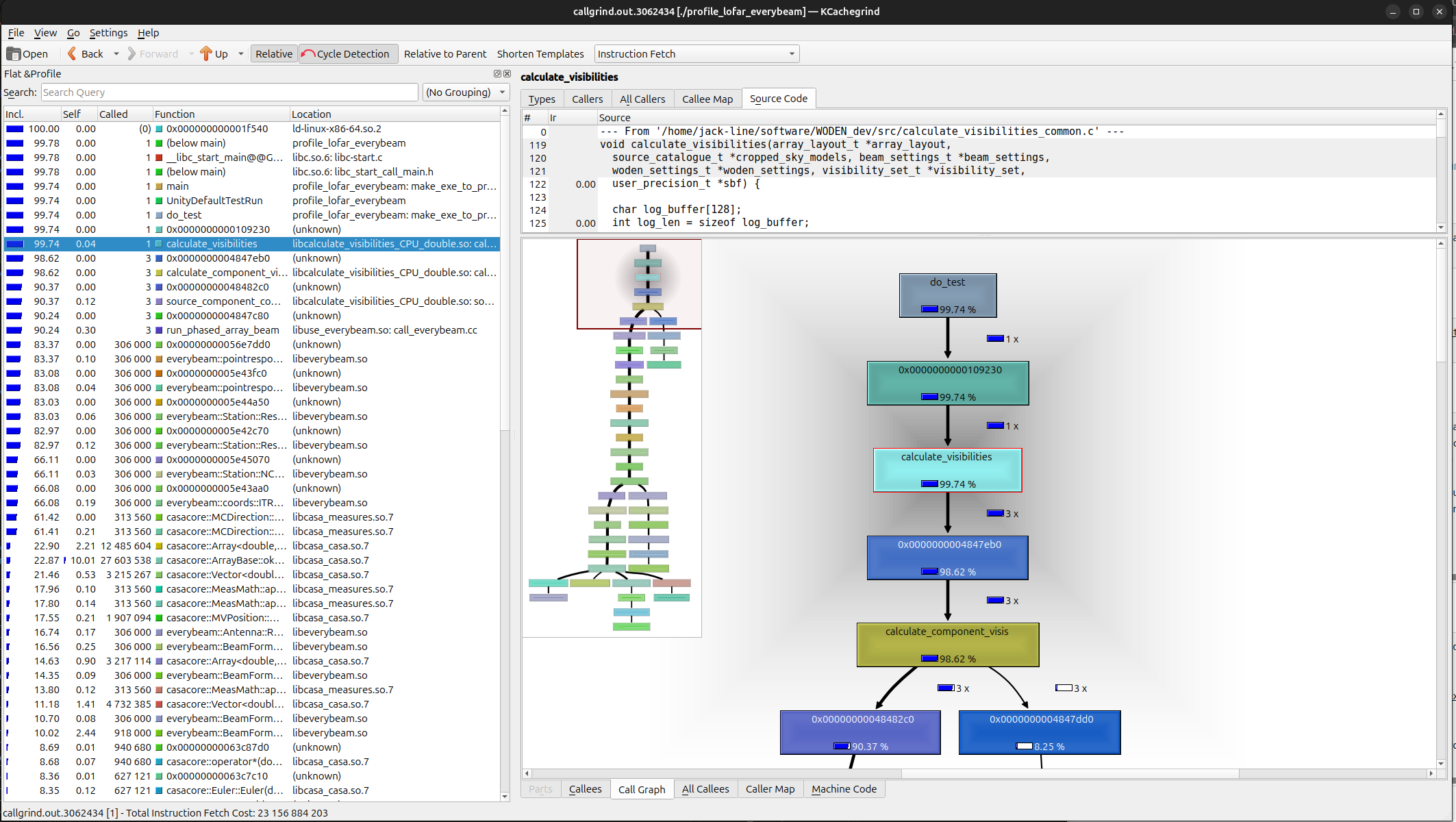
Again, plenty of tutorials online for how, and there are a tonne of features. For now I’ll just focus on the call graph in the bottom right corner. Here we have a call graph, and can see that 99.74% of our time has been spent calling calculate_visibilities. This is good, means our test is doing what it should. If I scroll down a little, I see this:
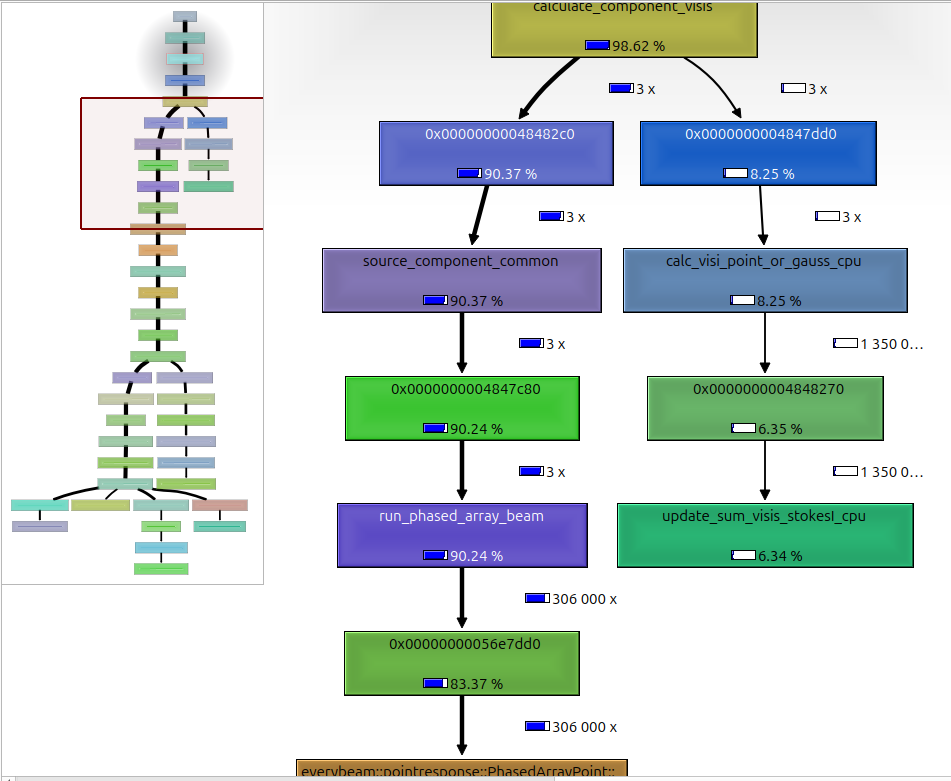
This is telling me that run_phased_array_beam (which is calculating the LOFAR phased array beam) is taking up 90.24% of the time, so is the dominant calculation. You can keep scrolling around and seeing exactly where time is being spent, to try and see if there are any easy gains to be made. Handy.
Making the release docker images
Hopefully it should be pretty straight forward to maintain the docker images, at least the CUDA one. Probably the most annoying part of this is that you’ll have to install docker on your machine.
In WODEN/docker, you’ll find the Docker files for the CUDA version (Dockerfile_cuda). There is a HIP version, but only for the Pawsey Setonix supercluster (Dockerfile_setonix). I don’t have access to any other AMD GPUs, so this was the only place that it could be tested. Running the script make_docker_image.sh will create the images. It’s also set up to push to my repo, so if you inherit this project, you’ll probably have to push somewhere else.
Each time you make a new release, you’ll need to tweak a couple of things. At the top of Dockerfile_cuda, you’ll see lines that looks like this:
ENV WODEN_TAG=v2.5.0
ENV EVERYBEAM_TAG=mwa_python_wrapper
ENV HYPER_VERSION=0.10.0
ENV RUST_VERSION=1.84.0
which sets version of repos to copy. Modify that to whatever release you’re building, and whatever version of the dependencies you want. In
make_docker_image.sh, there is a line like woden_version="2.5". Again, change that to match whatever version you are building. Finally, in the line docker push jlbline/woden-${woden_version}:cuda-$arch, you’ll need to change jlbline to your docker repo.