Fornax A simulation
This example not only compares two sky model types, but compares the speed of the
float vs the double precision of WODEN. The simulation is run in GPU mode,
using a GTX 1080 Ti, and the imaging is done using the WSClean software.
Note
Running and imaging both Fornax A simulations will need 3.6 GB of storage.
If you’re itching to immediately run something, you can run and image the first simulation with the following commands. Note you’ll have to have followed Post compilation (optional) to get the MWA FEE beam working.
Read on to find out what you’ve done or read the section before running the commands.
$ cd WODEN/examples/FornaxA
$ ./FornaxA_msclean_simulation.sh
$ ./FornaxA_msclean_imaging.sh
In this simulation we’ll compare two different models of Fornax A which were used in Line et al. 2020. First up we’ll look at a model made from WSClean multi-scale CLEAN outputs. The command looks like this:
run_woden.py \
  --ra0=50.67 --dec0=-37.2 \
  --freq_res=80e+3 --num_freq_channels=16 \
  --time_res=8.0 --num_time_steps=14 \
  --metafits_filename=../metafits/1202815152_metafits_ppds.fits \
  --cat_filename=srclist_msclean_fornaxA_phase1+2.txt \
  --band_nums=1,2,3,4,5 \
  --output_uvfits_prepend=./data/FornaxA_msclean \
  --primary_beam=MWA_FEE \
  --precision=${precision}
where ${precision} is either “float” or “double” to choose the precision of the simulation. Here we have set the phase centre to RA, Dec = 50.67, -37.2, the fine channel frequency to 80 kHz with 16 fine channels per coarse band, the time sampling to every 8 seconds for 14 time samples, and used a metafits file for all other observational settings. I’ve selected to run the first 5 coarse bands via the --band_nums parameters, which combined with the --output_uvfits_prepend argument should create 10 uvfits files:
data/FornaxA_msclean_${precision}_band01.uvfits
data/FornaxA_msclean_${precision}_band02.uvfits
data/FornaxA_msclean_${precision}_band03.uvfits
data/FornaxA_msclean_${precision}_band04.uvfits
data/FornaxA_msclean_${precision}_band05.uvfits
each of which will contain 16 frequency and 14 time steps. I’ve selected to use the MWA_FEE primary beam, which will use the MWA fully embedded element (FEE) primary beam pattern (using the delays specified in the metafits to point the beam). As described in Post compilation (optional), you’ll need to grab an hdf5 file and set an environment variable to point to it for this to work.
The sky model is specified using --cat_filename, which contains 4544 point and 1736 Gaussian components, and was made from WSClean CLEAN components. The “float” precision version took about 37 seconds on my card, with the “double” taking about 60 seconds. If you run the imaging, you should get something that looks like this:
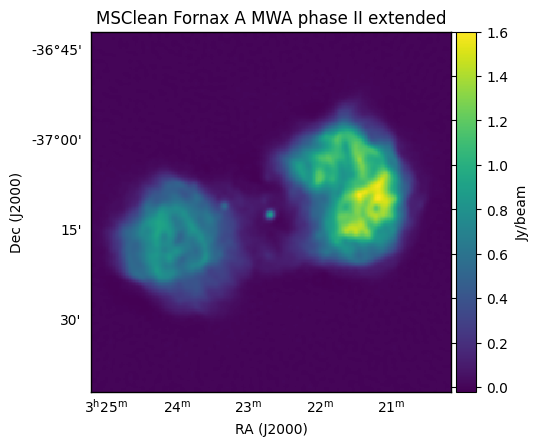
This is an MWA phase II extended array simulation, hence the ~ arcmin resolution. Next, we can compare this to an equivalent shapelet simulation, where the only change to the command is to change the sky model:
--cat_filename=srclist_shapelets_fornaxA_phase1+2.txt
You can run and image the shapelet simulation via:
$ ./FornaxA_shapelet_simulation.sh
$ ./FornaxA_shapelet_imaging.sh
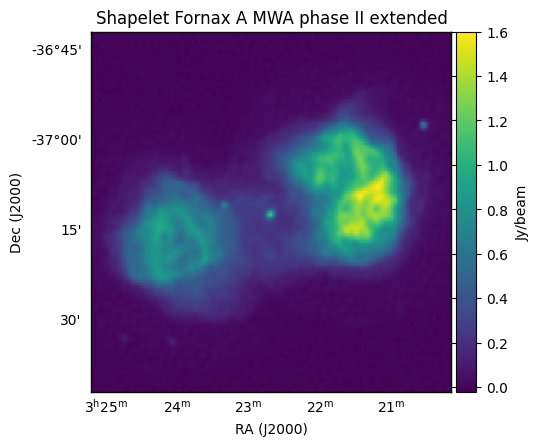
with the “float” simulation taking 48 seconds on my GPU, the “double” taking 109 seconds, and the image looking like: